QR Code Staff Check-in/out Tracking: How Does Device-Free Attendance Work?
Staff attendance with QR and location verification on the phone, without fingerprint devices or cards: how to set it up, how cheating is prevented and how the timesheet is built.
Staff attendance tracking usually brings to mind fingerprint devices, card readers and cables, along with installation, maintenance and breakdowns. Small and mid-sized businesses now have a simpler option: QR code attendance with location verification. In this post we explain how it works, how cheating is prevented and how the timesheet is prepared.
What is an attendance system?
An attendance system (called PDKS in Türkiye) records when employees arrive and leave, then calculates hours worked, overtime and missing days from those records. Traditional systems put a device at the entrance. Device-free attendance uses the phone already in your employees' pockets.
How does device-free attendance work?
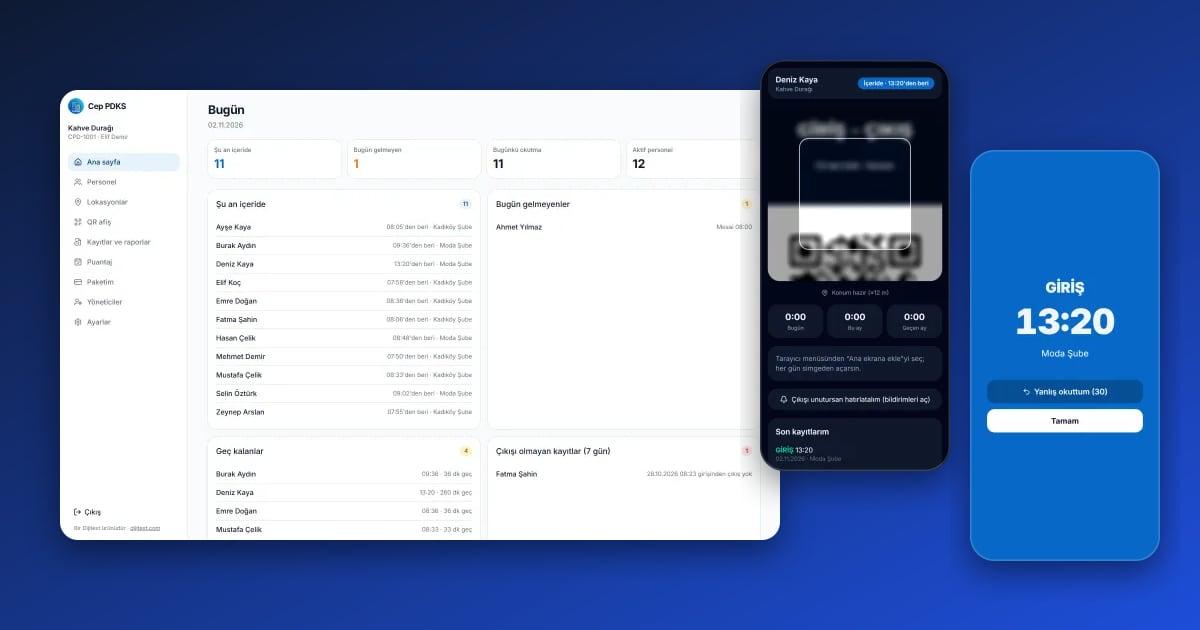
Here are the steps, using DijiText's Cep PDKS as an example:
- Mark your workplace: Pick the location on a map and set a radius between 50 meters and 2 kilometers.
- Hang the QR poster: Design a poster with your color and logo, print the PDF and hang it at the entrance.
- Invite your staff: A one-tap invite goes out via WhatsApp; each employee links their phone once and the app is added to the home screen. No app store download is needed.
- Records arrive automatically: Staff scan the QR, the location is verified and the record lands in your dashboard instantly.
"Can't they scan from home?"
This is the most common question. Several checks work together on every scan:
- Location is mandatory: Check-ins and check-outs outside the radius are rejected; old or cached locations are not accepted.
- The phone is bound to one person: Scanning for a colleague does not work.
- The QR is signed: It cannot be forged, and when renewed the old one becomes invalid.
- Workplace network (optional): A requirement to be connected to the workplace internet can be added.
To be honest, browsers cannot fully detect fake-location apps; that is why suspicious records are flagged and no one should promise a "100% guarantee".
Staff privacy
Location is personal data, so the design must respect that. Cep PDKS takes the location only once, at the moment of scanning, and stores no coordinates; only the distance to the workplace is saved in meters. No face, fingerprint or selfie is required. Records cannot be deleted; corrections are made with an additional entry and a reason, visible to the employee.
Timesheet and accountant
At month end, hours worked, overtime, lateness and missing days arrive calculated, exportable as Excel and PDF. You give your accountant a read-only, revocable link without creating an account; they download the timesheet themselves.
Staff without phones and multiple branches
Place a tablet at the entrance and turn on kiosk mode: the QR on screen changes every 30 seconds and staff without phones enter a PIN. If you have several branches, each becomes a separate location and branch managers see only their own.
Cep PDKS is free forever for up to 5 employees and its interface is in Turkish. You can set it up in 10 minutes at cepdks.dijitext.com. If your business needs a tailored system, let's design it together with our custom software service.